It was great to see so many students starting with us in Term 2 – more than 100, across seven schools.
We look forward to seeing what our young coders can achieve during the weeks ahead.


It was great to see so many students starting with us in Term 2 – more than 100, across seven schools.
We look forward to seeing what our young coders can achieve during the weeks ahead.
 We’re pleased to announce that Meadowbank School is joining Code Champions in Term 2.
We will be running two coding classes on Mondays as an external activity in the after-school Club Meadowbank programme (meadowbank.school.nz/club-meadowbank-programmes/).
If you’d like to know more, please contact us at info@codechampions.nz or go to codechampions.nz/ms/
With Term 1 now completed, we wanted to show you some of the great coding work that’s been going on.
Creating a game with Unity
Some groups were using the coding platform Unity (unity3d.com) to learn programming techniques and create simple games.


‘Jump’: Check out a game created by one of our young coders. You will need to download the files to your PC to be able to play. Download folder with files here This folder contains the game .exe file, entitled ‘Jump’ (the symbol is a yellow circle with a black dollar sign), plus the UnityPlayer.dll file, which will run the game.
Students have their own games saved. If you install Unity (codechampions.nz/2018/03/02/quick-guide-to-installing-unity/), they should be able to show you what they have created.
Coding with BeetleBlocks
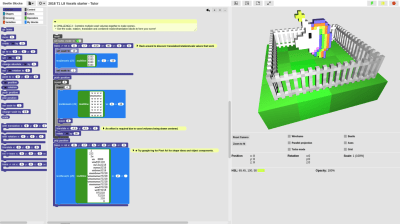
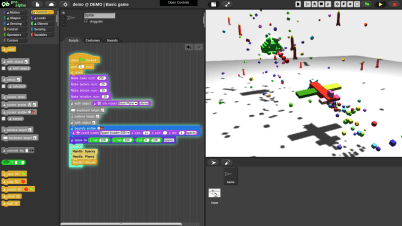
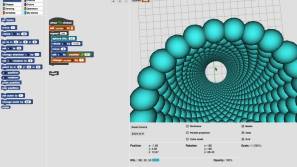
Other groups used BeetleBlocks (beetleblocks.com). Here are some screenshots showing examples of work done.
Interpreter:
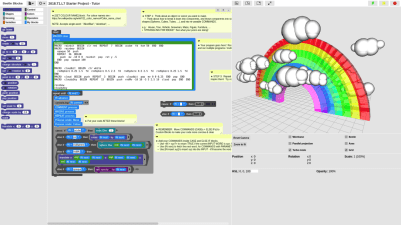
Pixel Art:

Voxel Scene:
Basic Game:
Compound Object:

Find out more about how the classes are using BeetleBlocks at codechampions.nz/2018/03/12/hacking-and-working-with-beetleblocks/
Looking ahead to Term 2, 2018
We’re busy planning for Term 2. If you have any questions or are interested in finding out more about Code Champions classes, please contact info@codechampions.nz
 Want to continue coding in the holiday break? Peter Miller describes some of the ways you can do this.
Diversify your coding
 Doing and using different projects / activities / languages / environments will give you perspective on, and grow, your coding abilities and transferable skills:
Grow your Hacking skills
Hacking is how you teach yourself to understand the commands and capabilities in a language and environment, how to combine them, and how they interact:
Be methodical
Complex code is built from simple beginnings. Use this simple methodology to grow your code and coding skills:
Be creative
 Coding requires creativity, both to solve problems and to come up with ideas / features which let you develop your coding skills.
Do code
Coding involves actively starting and growing your projects, by adding code that features a diverse range of core concepts. If you are using these concepts and growing your code, then chances are you’re coding!
Coding involves a diverse range of activities. Make sure you are spending time on many different activities; switch to a different activity, or start a new project/prototype, if not:-
Practice good device hygiene by limiting the amount of time you spend on all devices, including time coding! Coding takes time and concentration but also requires rests/breaks, and doing a diverse range of other physical and mental activities. Help your coding by giving yourself a break!
Not coding
Compiled by Peter Miller, tutor, Code Champions
Students at Churchill Park School, Marist College and St Heliers School are coding with our tutor Peter Miller. Here’s a summary of the work that he’s doing with his classes in 2018.

Overall
Core concepts that will be covered/reinforced throughout any term include:
 During Term 1, students are learning about:
Any questions, get in touch at info@codechampions.nz
We’re delighted that Saint Kentigern College has decided Code Champions can be added to a student’s report as an ‘extension activity’, similar to the Duke of Edinburgh Scheme. This is great news!
It does not replace expectation of official extra-curricular involvement by College students – they still need to complete existing requirements – but the coding class will be recognised as an additional activity.
At the end of each term, we will provide SKC with a list of names of those who successfully complete the course (however, those who sign up but do not finish, or only partially attend, will not be eligible).
Just a reminder, there is no coding class at Saint Kentigern College on Monday 12 March – as per the schedule – but we’re back the week after (19 March).
Great to see everyone enjoying their coding last week:


 For those of our students using Unity, you can download the software to practise your coding at home. The class tutor Ken Ward’s prepared a quick guide to doing this, as follows:
 Using the thumbdrive
Open the thumb drive and navigate to \Installers\Unity.
Without using the thumbdrive
Alternatively, you can download and install from: https://unity3d.com/get-unity/download
Create an account
When using Unity for the first time you will need to create an account. Just use the personal/free licence as this is free for students.
Visual Studio will also ask you to make login or create a Microsoft account, but you can just skip this as an account is not required. When installing Visual Studio make use to select the Unity Tools Option and uncheck the option install Unity 2017.2.0f3 which will appear after selecting unity tools.
We hope this helps. If you’re having trouble with this process, get in touch (info@codechampions.nz) or ask Ken at a class, and he’ll be happy to help.
The Code Champions team
Yesterday’s inaugural classes at St Heliers School completed our first full week of Term 1.
It was another great afternoon of coding. The two groups of eager coders really got stuck in, exploring and creating code, and manipulating 3D images. (The Year 8 class was away on camp, so will kick off next week.)
Run by Peter Miller, the class this term is using BeetleBlocks (beetleblocks.com) as the platform for developing the students’ knowledge and understanding of computer programming. They made an awesome start. Well done. Roll on next week.
Check out some of the action from the first session.


On Wednesday, we started our coding classes at Marist College – our first at a girls-only school.
It was great to see two groups of eager coders getting stuck in, exploring and creating code, and manipulating 3D images.
Run by Peter Miller, the class this term is using BeetleBlocks (beetleblocks.com) as the platform for developing the girls’ knowledge and understanding of computer programming. They made an awesome start and thanks, as well, to the senior girls who gave a helping hand.


Photos by Teresa Wilkinson
 codechampions.nz